Tool 01
FreeHighlight Reader
AI Text to Speech for Windows
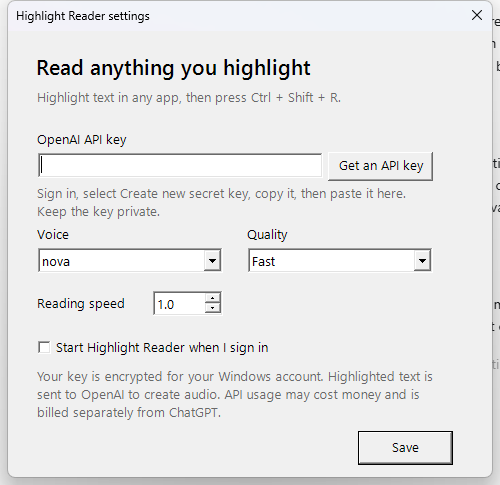
Highlight text in almost any Windows app, press Ctrl + Shift + R, and hear it read aloud in a natural AI voice. That’s the whole idea.
The app is free and open source. You bring your own OpenAI API key, so OpenAI API usage may incur charges billed by OpenAI. Highlight Reader is an independent project and is not affiliated with, endorsed by, or an official product of OpenAI.
- Works across almost any Windows app — browsers, documents, email, PDFs
- Adjustable voice, audio quality, and reading speed
- Your OpenAI API key is stored encrypted, locally on your machine
- Optional start with Windows, plus quick tray controls
v1.0.0 beta · Windows
Press
Highlight anything. Hear it instantly.
Getting Started
Three steps
01
Download and unzip
Grab the free ZIP and extract it anywhere on your PC.
02
Install and add your key
Run the installer, open Settings, and paste your own OpenAI API key.
03
Highlight and listen
Select any text, press Ctrl + Shift + R, and hear it read aloud.
Heads up: this is an early Windows beta. Because the current build is unsigned, Windows may show a security warning on first run — choose “More info” and then “Run anyway” if you’re comfortable proceeding.
What’s Next
More tools are on the way.
This page is the home for anything useful I build and decide to share. When something new is ready, it shows up here.